![Trainual Logo (White).png]](https://help.trainual.com/hs-fs/hubfs/Logo/Trainual%20Logo%20(White).png?height=39&name=Trainual%20Logo%20(White).png)
Time to spruce up your profile by adding your best headshot! 📸
Remember, if the directory is enabled in your company's account, everyone will see your avatar - so make sure you're looking fresh and professional.

To upload your avatar for the first time:
-
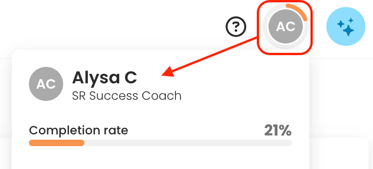
Click on your avatar initials from your top navigation bar.
-
Open your user page by clicking on your name from the drop-down menu.
-
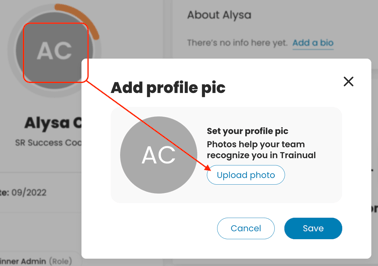
Click on your avatar initials and hit the "Upload photo" button from the pop-up.
-
Find your preferred photo from your device and select "open."
-
Make adjustments (if desired)
-
Adjust the distance of the image using the adjustment bar.
-
Click, hold, drag, and release the photo into the desired placemen.
-
-
Click "Save" to finalize.
To replace your existing avatar:
-
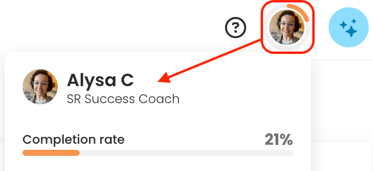
Click on your current avatar from your top navigation bar.
-
Open your user page by clicking on your name from the drop-down menu.
-
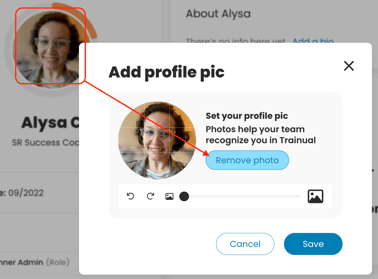
Click on your avatar and hit the "Remove photo" button, followed by the "Upload photo" button from the pop-up.
-
Find your preferred photo from your device and select "open."
-
Make adjustments (if desired)
-
Adjust the distance of the image using the adjustment bar.
-
Click, hold, drag, and release the photo into the desired placemen.
-
-
Click "Save" to finalize.
Learn more about customizing your profile:
-
Adjust your personal Trainual account settings to your preferences.