---
title: Content Import
description: Learn how to bulk import your existing training with AI-powered organization that automatically brings over and sorts your content info into a Trainual-optimized structure.
---
[Skip to content](https://help.trainual.com/en/content-import#main-content)
English
Show submenu for translations
![Trainual Logo (White).png\]](https://help.trainual.com/hs-fs/hubfs/Logo/Trainual%20Logo%20(White).png?height=39&name=Trainual%20Logo%20(White).png)
Open main navigation
Close main navigation
- English
Show submenu for translations
👋 Hi! Need help fast? Ask the Bot (bottom right ↘)
- There are no suggestions because the search field is empty.
1. [Help center](https://help.trainual.com/en?hsLang=en)
2. [Building & structuring training content](https://help.trainual.com/en/building-structuring-training-content?hsLang=en)
3. [AI & smart-assist tools](https://help.trainual.com/en/building-structuring-training-content?hsLang=en#ai-smart-assist-tools)
# Content Import
## Learn how to bulk import your existing training with AI-powered organization that automatically brings over and sorts your content info into a Trainual-optimized structure.
---
Whether you're just setting up your account or growing your existing library over time, content importing gets your training into Trainual fast. Upload your files to keep every word just as you wrote it, while Trainual AI figures out where everything belongs for you!


- The content import feature is available as part of the [**Training suite**](https://trainual.com/training-suite). [**Contact** **our support team**](https://help.trainual.com/en/articles/7974748-contact-trainual?hsLang=en) for any subscription help. 🤗
- For now, content importing sorts your file's info into [**subjects**, **documents**, **pages**](https://help.trainual.com/en/subject-structure?hsLang=en), or [**file**](https://help.trainual.com/en/standalone-file-content-type?hsLang=en) content types. Support for [**more content types**](https://help.trainual.com/en/organize-your-content-standalone-vs-subjects?hsLang=en) is on our future road map.
- The information below is best suited for content creators. For more specifics around which areas of the account and pieces of content your employees can access, review their **[permissions](https://help.trainual.com/en/articles/5589497-permission-levels?hsLang=en)** and **[subject content access](https://help.trainual.com/en/articles/5575360-manage-subject-content-access?hsLang=en)**.
🗂️ **Table of contents**: Skip around to just the parts you need with these links.
- [**Overview**](https://help.trainual.com/en/content-import#overview).
- [**Video walkthrough**](https://help.trainual.com/en/content-import#video-walkthrough).
- [**Start a content import**](https://help.trainual.com/en/content-import#start-an-import).
- [**Step 1: Gather and prep your files**](https://help.trainual.com/en/content-import#step-1-gather-and-prep-files).
- [**Supported file types**](https://help.trainual.com/en/content-import#supported-file-types).
- [**File limits**](https://help.trainual.com/en/content-import#file-limits).
- [**Step 2: Open the import content window**](https://help.trainual.com/en/content-import#step-2-open-the-import-content-window).
- [**Import your content files**](https://help.trainual.com/en/content-import#import-your-content-files).
- [**Step 1: Upload your files**](https://help.trainual.com/en/content-import#step-1-upload-your-files).
- [**Step 2: Choose how each file is imported**](https://help.trainual.com/en/content-import#step-2-choose-how-file-is-imported).
- [**Finalize and roll out your content**](https://help.trainual.com/en/content-import#finalize-and-roll-out-your-content).
- [**Filter to view your imported content**](https://help.trainual.com/en/content-import#filter-your-content-view).
- [**FAQs**](https://help.trainual.com/en/content-import#FAQs).
- [**Learn more about quickly building out Trainual content**](https://help.trainual.com/en/content-import#learn-more-about-quickly-building-Trainual-content).
---
### Overview:
The content import feature breaks your original file info down into organized, searchable training. Once uploaded, you'll be able to review, edit, assign, and give it all to your team for a centralized resource hub they'll come back to again and again.
👌 *Here's how importing saves you time and effort:*
- **📥 Upload in bulk**. Skip the copy-and-paste. Add up to 50 files during a single import batch to save hours of manual work.
- **🤷♀️ No guesswork**. Trainual AI reads your files and decides how to best split them up in Trainual, so something like a long employee handbook becomes a set of organized subjects, documents, and pages instead of one giant wall of text.
- **🔒 Preserve your original text**. Every word transfers over exactly as written from your original file. Once it's in Trainual, you can edit it whenever you need to.
- **🎮 Stay in control**. Fine-tune things before importing, and publish content only when you're ready. Imported content will stay hidden from your team until then.
Bulk imports, smart organizing, every word intact, and full control over what goes live. With how much time this will save you, it seriously might feel a little like magic. 🪄

---
### Video walkthrough:
| ✏️ **Want the written steps too?** Pick a step to jump to: |
| --- |
- 0:11 **→** [**Open the import content window**](https://help.trainual.com/en/content-import#step-2-open-the-import-content-window).
- 0:31 **→** [**Gather and prep your files**](https://help.trainual.com/en/content-import#step-1-gather-and-prep-files).
- 0:55 **→** [**Upload your files**](https://help.trainual.com/en/content-import#step-1-upload-your-files).
- 1:33 **→** [**Choose how each file is imported before importing**](https://help.trainual.com/en/content-import#step-2-choose-how-file-is-imported).
- 3:04 **→** [**Roll it out to your team**](https://help.trainual.com/en/content-import#roll-it-out-to-your-team).
- 4:06 **→** [**Contact us for additional support**](https://help.trainual.com/en/articles/7974748-contact-trainual?hsLang=en).
---
### Start a content import:
Set yourself up for a smooth import by preparing your files and learning the quickest ways to open the import content feature inside Trainual.
| 🔹 **Step 1 →** Gather and prep your files. |
| --- |
| **✅ Supported file types**: | **📏 File limit**: | **📑 How your file comes in**: |
| --- | --- | --- |
| - DOCX (*recommended*) - PDF - PPTX - XLSX - TXT - MD | - Up to 50 files per import batch. - Up to 25 MB per file. - Up to 100 MB per import batch. | Uploaded XLSX and PPTX file types import into Trainual as a [**standalone file**](https://help.trainual.com/en/standalone-file-content-type?hsLang=en). All other content types come into Trainual as [**subjects**, **documents**, **and pages**](https://help.trainual.com/en/subject-structure?hsLang=en). Trainual AI sorts your content into an organized structure that's optimized for the platform. Every word stays the same, but your content is now **[editable](https://help.trainual.com/en/trainuals-content-editor?hsLang=en)** and [**assignable**](https://help.trainual.com/en/articles/8224735-group-share?hsLang=en) inside Trainual. |
🔥 **Tip**: Want formatting to look as close to the original as possible? Import your content as a **DOCX file**. These items keep things consistent from file to file, so you'll spend less time on aesthetic cleanup after you import.
**🔄 To convert your files to DOCX**:
Look for an "**Export as DOCX**" or "**Download as Word**" option in the tool where you created the file. Or **ask an AI tool** like ChatGPT or Claude to convert it to a DOCX file.
| 🔹 **Step 2 →** Open the import content window. |
| --- |
**📚 Under the** ["**All content**" **page**](https://help.trainual.com/en/articles/5600754-company-policies-processes?hsLang=en).
1. **Expand** "**Content**" from the left-hand navigation menu.
2. Select "**All content**."
3. Open the "**Create**" **button** drop-down menu.
4. Click "**Import content**."
**⬆️ Use the [top navigation](https://help.trainual.com/en/articles/6038273-top-navigation?hsLang=en)**.
1. Click the "**+**" **symbol** in your **top navigation**.
2. Select "**Import content**."
---
### Import your content files:
Here's how to add your files, review how Trainual AI will organize them all, and how to launch your full import when it's ready to go. 🏁
| 🔹 **Step 1 →** Upload your files. |
| --- |
1. Open the [**import content window**](https://help.trainual.com/en/content-import#step-2-open-the-import-content-window).
2. **Drag and drop**, or **choose your files** to add to the upload area.
3. Review the "**Selected files**" **list** **to confirm** everything you added is there.
- 🗑️ If you need **to remove any files**, just click the "x" next to them.
4. **Click** "**Continue**" to proceed.
**🟡 Trainual AI will start building your import plan**. Larger files can take a bit longer, so if you need to step away, click the "**Minimize**" **button** to work on other tasks while you wait.
📝 **Please note**: Clicking the "**x**" **in the top-right corner of this window** **cancels your entire import**, so be sure to only hit the "**Minimize**" **button** if you need to step away.
| 💭 **Strategy corner**: Feeling overwhelmed by a big import? 🫨 Try breaking your items into smaller batches by department or topic. You'll not only get comfortable with the process faster but have fewer decisions and items to review at once. |
| --- |
| 🔹 **Step 2 →** Choose how each file is imported. |
| --- |
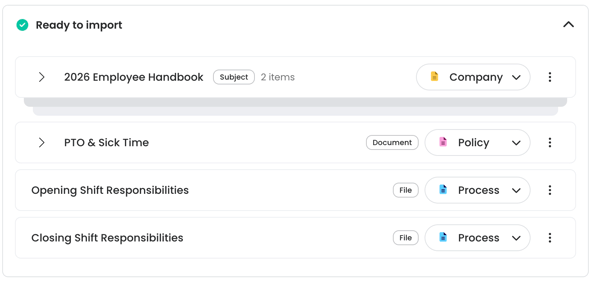
When your import plan is ready, you'll see it all **listed under a** "**Ready to import**" area.
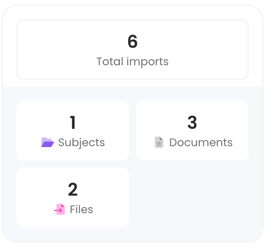
You'll also see a **summary panel on the right** that shows how many content types will be created, along with any flagged errors or issues for review.
🕵️♂️ *Before you officially import your content, fine-tune it:*
1. **Rename items**. Click a content title to edit it.
2. **Change the content category**. Use the drop-down on each line item to house it under either the [**company**, **policy**, **or process category**](https://help.trainual.com/en/articles/5600754-company-policies-processes?hsLang=en).
3. **Reorganize the content**. Click the arrow next to a subject or document to see what's inside. Drag and drop items into a new order or under a different subject.
**🚀 Click** "**Import content**" when everything looks good **to launch the upload**. You can hit the "**Minimize**" **button** to keep working in Trainual — we'll email you when it's done. 📧
Review the import summary when it's ready, then click "**View your content**" to see all your content inside Trainual.
---
### Finalize and roll out your content:
All your imported content stays unpublished until you decide it's ready for your people. Review it all and try using these features to Trainualify things before publishing.
| **Feature**: | **What it can do**: |
| --- | --- |
| **👩🎨 [Content editor](https://help.trainual.com/en/trainuals-content-editor?hsLang=en)**. | Take your content beyond the original file by inputting more materials like [**videos**](https://help.trainual.com/en/upload-host-and-link-standalone-videos?hsLang=en), [**embeds**](https://help.trainual.com/en/kb-search-results?q=embed&type=KNOWLEDGE_ARTICLE&groupId=199462867241&hsLang=en), and [**emojis**](https://help.trainual.com/en/articles/6869609-emojis?hsLang=en). 🤩 |
| **🎓 [Auto-generated tests](https://help.trainual.com/en/articles/8802467-auto-generate-tests?hsLang=en)**. | Use your newly uploaded subject material to [**auto-generate tests**](https://help.trainual.com/en/articles/8802467-auto-generate-tests?hsLang=en) to assess your teammates' strengths and find training improvements. |
| **👨💼 [Content owners](https://help.trainual.com/en/subject-owners?hsLang=en)**. | Delegate content management to a specific team member to ensure your [**content creation plan**](https://share.trainual.com/subject/f3321ea9-f370-431c-b5c6-a33a0719ee26) stays strong. |
| **🤖 [AI & smart-assist tools](https://help.trainual.com/en/building-structuring-training-content#ai-smart-assist-tools)**. | Take advantage of Trainual's AI features that [**rewrite sections**](https://help.trainual.com/en/ai-assistant-content-editing?hsLang=en), [**create outlines**](https://help.trainual.com/en/smart-outline?hsLang=en) for additional info, [**translate**](https://help.trainual.com/en/translate-content-with-smart-tools?hsLang=en) content for you, and more. |
| **⏺️ [Content statuses & roll out options](https://help.trainual.com/en/articles/8224735-group-share?hsLang=en)**. | Decide what's ready to be [**published**](https://help.trainual.com/en/articles/5142435-topic-statuses?hsLang=en), what needs a little [**more polish**](https://help.trainual.com/en/trainuals-content-editor?hsLang=en), and what can stay put for now. Then choose how to get your training to your people: 1. Assign to [**individuals**](https://help.trainual.com/en/articles/5608142-require-completion-of-subject?hsLang=en). 2. Assign to**[groups](https://help.trainual.com/en/articles/8224735-group-share?hsLang=en)**. 3. Assign through a**[training path](https://help.trainual.com/en/templates-training-paths?hsLang=en)**. 4. Referencable and accessible via**[public share](https://help.trainual.com/en/articles/6122740-public-share?hsLang=en)**. |
---
### Filter to view your imported content:
To easily find your imported content, use this content filter. 👇
1. **Expand** "**Content**" from the left-hand navigation menu.
2. Select "**All content**."
3. Click the "**Filter**" **button**.
4. Toggle on the "**Imported content only**" **option**.
- (*Optional*) **To quickly view a specific set of imports**, select it from the "Import batch" drop-down. Each batch in the menu will show the import date, the number of files, and the individual who imported it.
---
### FAQs:
***Can I import a ZIP folder with the content import feature?***
Not yet, but this is on our road map. Stay tuned! 🛣️
***How do I upload an exact copy of my file into Trainual?***
For diagrams, brand guides, or other heavily designed files, [**upload them as a file content type instead**](https://help.trainual.com/en/standalone-file-content-type?hsLang=en) of using the content import feature. Files uploaded as a content type will keep all of their original formatting, but they *won't* be editable inside Trainual.
***Is the old import documents feature still available?***
No, the previous import documents feature was retired on September 29th, 2026, and replaced by the [**content import** **feature**](https://help.trainual.com/en/content-import?hsLang=en) for a *much* improved user experience. 🤓
***How can I submit my feedback and ideas about features?***
If you'd like to share your thoughts on the content import feature or have something else you'd like to see added in the future, send us your [**feature requests and ideas**](https://help.trainual.com/en/submit-feature-requests-and-product-feedback-about-trainual?hsLang=en).
---
### Learn more about quickly building out Trainual content:
- Produce well-structured content with [**Trainual's AI content creator**](https://help.trainual.com/en/trainuals-ai-content-creation?hsLang=en).
- Refine, refresh, and rewrite your existing content using the [**AI assistant**](https://help.trainual.com/en/ai-assistant-content-editing?hsLang=en).
- [**Synchronously work with your team**](https://help.trainual.com/en/co-creating-content?hsLang=en) on content creation inside Trainual pages.
- [Training suite foundations](https://help.trainual.com/en/training-suite-foundations?hsLang=en#main-content)
- [Learning & certifications](https://help.trainual.com/en/training-suite-foundations?hsLang=en#learning-certifications)
- [Community & resources](https://help.trainual.com/en/training-suite-foundations?hsLang=en#community-resources)
- [Operations suite hub](https://help.trainual.com/en/operations-suite-hub?hsLang=en#main-content)
- [About operations suite](https://help.trainual.com/en/operations-suite-hub?hsLang=en#about-operations-suite)
- [Operations toolkit](https://help.trainual.com/en/operations-suite-hub?hsLang=en#operations-toolkit)
- [Performance suite hub](https://help.trainual.com/en/performance-suite-hub?hsLang=en#main-content)
- [About performance suite](https://help.trainual.com/en/performance-suite-hub?hsLang=en#about-performance-suite)
- [Performance toolkit](https://help.trainual.com/en/performance-suite-hub?hsLang=en#performance-toolkit)
- [Account & user settings for training suite](https://help.trainual.com/en/account-user-settings-for-training-suite?hsLang=en#main-content)
- [Account setup & management](https://help.trainual.com/en/account-user-settings-for-training-suite?hsLang=en#account-setup-management)
- [My profile & preferences](https://help.trainual.com/en/account-user-settings-for-training-suite?hsLang=en#my-profile-preferences)
- [Notifications & emails](https://help.trainual.com/en/account-user-settings-for-training-suite?hsLang=en#notifications-emails)
- [Users, groups & access for training suite](https://help.trainual.com/en/users-groups-access-for-training-suite?hsLang=en#main-content)
- [Adding & managing users](https://help.trainual.com/en/users-groups-access-for-training-suite?hsLang=en#adding-managing-users)
- [Groups & group management](https://help.trainual.com/en/users-groups-access-for-training-suite?hsLang=en#groups-group-management)
- [Permissions & access control](https://help.trainual.com/en/users-groups-access-for-training-suite?hsLang=en#permissions-access-control)
- [Roles, responsibilities & org structure](https://help.trainual.com/en/users-groups-access-for-training-suite?hsLang=en#roles-responsibilities-org-structure)
- [Building & structuring training content](https://help.trainual.com/en/building-structuring-training-content?hsLang=en#main-content)
- [Content builder basics](https://help.trainual.com/en/building-structuring-training-content?hsLang=en#content-builder-basics)
- [Creating subjects, documents & pages](https://help.trainual.com/en/building-structuring-training-content?hsLang=en#creating-subjects-documents-pages)
- [Creating tests](https://help.trainual.com/en/building-structuring-training-content?hsLang=en#creating-tests)
- [Creating other content types](https://help.trainual.com/en/building-structuring-training-content?hsLang=en#creating-other-content-types)
- [Templates & starter content](https://help.trainual.com/en/building-structuring-training-content?hsLang=en#templates-starter-content)
- [AI & smart-assist tools](https://help.trainual.com/en/building-structuring-training-content?hsLang=en#ai-smart-assist-tools)
- [Organizing & managing training content](https://help.trainual.com/en/organizing-managing-training-content?hsLang=en#main-content)
- [Arranging content](https://help.trainual.com/en/organizing-managing-training-content?hsLang=en#arranging-content)
- [Content settings & requirements](https://help.trainual.com/en/organizing-managing-training-content?hsLang=en#content-settings-requirements)
- [Content publishing, sharing & visibility](https://help.trainual.com/en/organizing-managing-training-content?hsLang=en#content-publishing-sharing-visibility)
- [Collaborating on content](https://help.trainual.com/en/organizing-managing-training-content?hsLang=en#collaborating-on-content)
- [Content updates & cleanup](https://help.trainual.com/en/organizing-managing-training-content?hsLang=en#content-updates-cleanup)
- [Training tools & experience](https://help.trainual.com/en/training-tools-experience?hsLang=en#main-content)
- [Accessing your training](https://help.trainual.com/en/training-tools-experience?hsLang=en#accessing-your-training)
- [Encouraging training completions](https://help.trainual.com/en/training-tools-experience?hsLang=en#encouraging-training-completions)
- [AI help & search](https://help.trainual.com/en/training-tools-experience?hsLang=en#ai-help-search)
- [Enhancing training with media & embeds](https://help.trainual.com/en/enhancing-training-with-media-embeds?hsLang=en#main-content)
- [Videos & screen recordings](https://help.trainual.com/en/enhancing-training-with-media-embeds?hsLang=en#videos-screen-recordings)
- [Images, audio & GIFs](https://help.trainual.com/en/enhancing-training-with-media-embeds?hsLang=en#images-audio-gifs)
- [Content & media from other tools](https://help.trainual.com/en/enhancing-training-with-media-embeds?hsLang=en#content-media-from-other-tools)
- [Files & forms](https://help.trainual.com/en/enhancing-training-with-media-embeds?hsLang=en#files-forms)
- [Formatting & links](https://help.trainual.com/en/enhancing-training-with-media-embeds?hsLang=en#formatting-links)
- [Training reports & data](https://help.trainual.com/en/training-reports-data?hsLang=en#main-content)
- [Monitoring training progress](https://help.trainual.com/en/training-reports-data?hsLang=en#monitoring-training-progress)
- [Progress & completion data](https://help.trainual.com/en/training-reports-data?hsLang=en#progress-completion-data)
- [Recovery, history & results](https://help.trainual.com/en/training-reports-data?hsLang=en#recovery-history-results)
- [Troubleshooting](https://help.trainual.com/en/troubleshooting?hsLang=en)
- [Billing & plans for training suite](https://help.trainual.com/en/billing-plans-for-training-suite?hsLang=en#main-content)
- [Subscription basics](https://help.trainual.com/en/billing-plans-for-training-suite?hsLang=en#subscription-basics)
- [Modifying your subscription](https://help.trainual.com/en/billing-plans-for-training-suite?hsLang=en#modifying-your-subscription)
- [Integrations](https://help.trainual.com/en/integrations?hsLang=en#main-content)
- [Automation & workflows](https://help.trainual.com/en/integrations?hsLang=en#automation-workflows)
- [HRIS & payroll systems](https://help.trainual.com/en/integrations?hsLang=en#hris-payroll-systems)
- [Team productivity tools](https://help.trainual.com/en/integrations?hsLang=en#team-productivity-tools)
- [SSO & authentication](https://help.trainual.com/en/integrations?hsLang=en#sso-authentication)
- [Content, data & developer tools](https://help.trainual.com/en/integrations?hsLang=en#content-data-developer-tools)
- [About Trainual](https://help.trainual.com/en/about-trainual?hsLang=en#main-content)
- [Evaluating Trainual](https://help.trainual.com/en/about-trainual?hsLang=en#evaluating-trainual)
- [Industry compliance FAQs](https://help.trainual.com/en/about-trainual?hsLang=en#industry-compliance-faqs)
- [Partnerships](https://help.trainual.com/en/about-trainual?hsLang=en#partnerships)
- [Make an inquiry](https://help.trainual.com/en/about-trainual?hsLang=en#make-an-inquiry)
[](http://trainual.com)
Trainual.com Help Center
Copyright © 2025, Trainual