![Trainual Logo (White).png]](https://help.trainual.com/hs-fs/hubfs/Logo/Trainual%20Logo%20(White).png?height=39&name=Trainual%20Logo%20(White).png)
So you want to:
-
Delegate content creation to a subject matter expert?
-
Get team members intentionally involved in building content?
-
Designate a contact person for each subject?
You got it! 😃
You can assign ownership of any subject to a specific team member. This will give them full administrative access to edit, publish, and assign out any subject(s) they own, regardless of their permission level. This means a General user can be made subject owner if needed.
📥 To assign subject ownership on an existing subject:
-
Open the settings panel from the top of your subject page.
-
Click on "Choose owner" (or on the name and image of the individual currently owning this content).
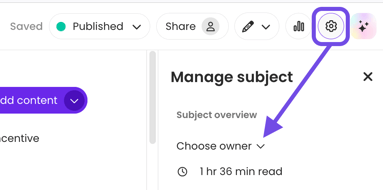
- Search for and select the new subject owner — your change will automatically be saved and applied.
📝 Please note: Trainual will notify this person via email that they're responsible for building out this subject (and keeping it current)!

🚨 Important notes:
-
Subjects can have only one owner at a time.
-
One person can be the owner of more than one subject.
✨ Check out more subject settings here. ✨