![Trainual Logo (White).png]](https://help.trainual.com/hs-fs/hubfs/Logo/Trainual%20Logo%20(White).png?height=39&name=Trainual%20Logo%20(White).png)
Become a smarter leader. Check your team pulse each week to get insights about how things are going, so you can take action when needed.
👉 Before you start:
- The team pulse feature is available as part of Trainual's operations suite, which includes four other powerful tools. ↗ Learn how to unlock them all here.
🗂️ Table of contents: Skip around to just the parts you need with these links.
Team pulse overview:
Let's make you the smartest leader you've ever been! 🤓
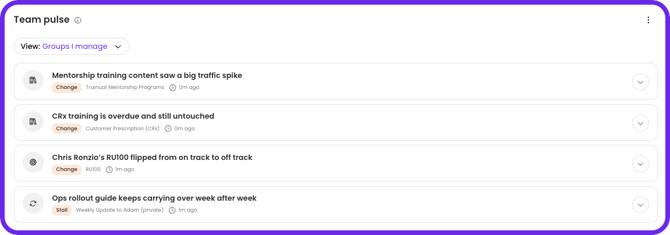
Team pulse is an AI-powered weekly briefing that lives on your homepage dashboard. It helps you quickly understand what’s happening across your team by surfacing notifications (called insights) showcasing:
-
📈 Trends - Where are things going?
-
💠 Patterns - What are we seeing consistently?
-
🚨 Emerging issues - What do we need to fix?
That way, you can take action before small problems become bigger ones.

The four types of insights:
| Type | What it means | Examples |
| Change | Something has changed. | |
| Stall | Something is stuck. | |
| Pattern | A theme is emerging. | |
| Prep | Something upcoming needs attention. |
|
What team pulse looks at:
Four data sources within Trainual generate team pulse insights:
-
🎯 Goals - Status changes, value movement, due date shifts, stale check-ins.
-
📥 Updates - What people are writing in their weekly and recurring check-ins.
-
🗓️ Meetings - Discussion topics and action items across 1:1s and team meetings
-
📚 Content - Training completion rates, search behavior, content engagement.
📣 FYI, more data sources are coming, including scorecards and more detailed insights about content that go beyond searches and views. 🤩
What team pulse is not:
An "Action" queue.
Your action queue (on your homepage dashboard) surfaces explicit tasks assigned to you such as access requests, feedback and comments, and content verifications. Team pulse surfaces AI-detected trends and patterns that inform how you lead, not specific to-dos. The two are complementary, not duplicative.
Real-time alerts.
Team pulse is a weekly briefing for the current week (Monday–Sunday). It’s not a notification system or a live activity feed.
A replacement for reporting.
Team pulse doesn’t replace reports. It’s a curated AI summary designed to orient you quickly and route you to the right place, not to surface raw data.
How to use team pulse:
- Log in to Trainual.
- On your homepage dashboard, scroll to the "Team pulse" header.
- Click on an insight to see more details.
-gif.gif?width=670&height=235&name=2026-05-12_09-28-15%20(1)-gif.gif)
- Open the drop-down menu to take an action.
-gif.gif?width=670&height=157&name=2026-05-12_09-32-28%20(1)-gif.gif)
FAQs:
Do I need to set anything up, or does team pulse appear automatically?
It appears automatically on your homepage dashboard as long as your account has a qualifying plan. There's nothing to configure or enable to start reviewing insights.
Is there a minimum amount of activity required before insights start generating?
The team pulse feature pulls from goals, updates, meetings, and training content that already exist in your account. If your team is actively using those features, insights will generate on their own as soon as the data is there.
📝 Please note: Accounts with very little activity across those areas may see fewer insights until more data is available.
Can I control who sees team pulse insights?
Visibility is determined by your plan, not by a permission setting. Any user on a qualifying plan will see the team pulse widget on their homepage. The insights they see will be generated based on what that user already has access to.
For example, the content they own, the meetings they attend, the updates they can see, or the goals they own or watch. There is no way to hide these insights from users.
As an Admin, what data am I seeing?
The signals you see are scoped to your direct relationships and roles in your account. If you have direct reports, you'll see insights about them by default. If you manage groups, own content, or use the operations suite, you'll see those relevant insights.
Can I see what a specific manager on my team is seeing in their team pulse?
Not currently. Each user's insights are scoped to their own data and relationships in their account. There is no way to view team pulse info from another user's perspective.
How often do insights refresh?
Team pulse is a weekly briefing scoped to a Monday through Sunday cadence. Insights are not real-time, so activity that happens during the week will be reflected in the briefing for that weekly scope rather than appearing instantly.
Can I customize which types of insights I see?
Not currently. Team pulse surfaces insights across all four types (change, stall, pattern, and prep) based on the activity it detects. However, you can dismiss individual insights.
What happens when I dismiss an insight?
Dismissed insights are removed from your insights list. If the underlying issue persists and is detected again in a future week, it may resurface as a new insight at that time.
If a problem keeps going unresolved, will it keep showing up week after week?
Yes, those can resurface as a new insight for that period. Dismissing an insight removes it for the current week, but it won't suppress future detection of the same pattern.
Can employees see that their activity is being analyzed and surfaced?
Team pulse analyzes data that already lives in Trainual and that managers already have access to. It does not give managers access to anything beyond their existing permissions, and it does not notify employees when their activity becomes an insight.
How is team pulse different from just reading my team's updates directly?
Reading updates individually means piecing the picture together yourself across multiple people and multiple weeks. Team pulse does that work for you by detecting patterns, stalls, and changes automatically and surfacing what actually needs your attention, along with a clear next step.
I already check my goals and meetings — will team pulse show me anything new?
Team pulse isn't just a recap of individual items. It looks across your team's goals, updates, meetings, and training activity together to surface things you might not catch by checking each tool separately, like the same blocker showing up across three different people's updates, or a goal that's approaching its due date with no recent check-in activity, for example.
How can I submit my feedback and ideas about features?
If you'd like to share your thoughts about team pulse or think of something else you'd like to see added in the future, send us your feature requests and ideas.
Learn more about Trainual:
- Make your organization's goals viewable and trackable.
- Put real purpose and structure to your meetings.
- Build scorecards to track progress towards goals.