![Trainual Logo (White).png]](https://help.trainual.com/hs-fs/hubfs/Logo/Trainual%20Logo%20(White).png?height=39&name=Trainual%20Logo%20(White).png)
Meet your team where they work the most! The Trainual x Slack integration lets your people harness the power of Trainual, without having to leave Slack, so your company's knowledge can work as fast as they do. 🚀
👉 Before you start:
- This integration option is available under all Trainual plans.
- You will need an Admin+ permission level in Trainual to initially set up this integration and access for your company account. Individual users can then connect their own profiles from Slack to start using the integration tools.
- ⚠️ Existing customers: The Slack integration was updated on March 18th, 2026, with new features. If you previously installed the integration, you may need to disconnect and reconnect Slack to access all the latest functionality.
🗂️ Table of contents: Skip around to just the parts you need with these links.
Trainual + Slack integration overview:
Picture this: a teammate shares a brilliant process breakdown in Slack, and instead of it being lost in the infinite scroll of a busy channel, you turn it into structured Trainual content on the spot. 🤩
That's just one way this integration turns the knowledge sharing, question answering, and collaboration your team already does every day in Slack into real, lasting value in your Trainual playbook.
🔓 Here's what you can unlock:
- 📓 Creating and capturing knowledge. Spot knowledge worth scaling? Build a new subject, document, or page directly from any Slack conversation.
- 🔎 Finding answers fast. Pull up the right how-to, process, or policy in seconds — right when you need it most. Don't see the info? Time to tackle that gap.
- 👨🏫 Staying informed and taking action. Never miss an assignment, content feedback, comment, or review again by taking action right then and there.
- 🤖 Getting AI answers. Ask a question, get an AI-powered answer sourced straight from your company's Trainual content — with sources.
Now that you know what's possible, let's get into the details. First up: connecting your Slack workspace to Trainual. 🤝
Step 1 — Connecting Trainual to Slack:
Just a few steps and your team will have Trainual superpowers inside Slack. 💪
- Expand the "Marketplaces" options from the left-hand navigation menu.
- Select "Integrations."
- Search for and open “Slack.”
- Click the "Add to Slack” button.

- Enter your workspace's Slack URL on the Slack authorization redirect page.
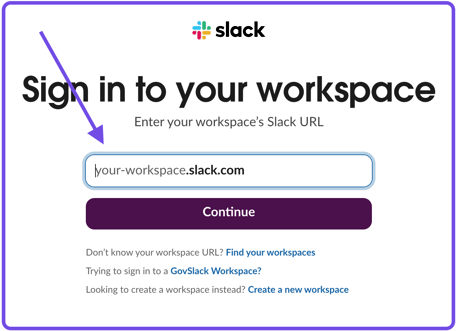
- Hit the "Continue" button.
- Sign in to the preferred Trainual account you'd like to connect.
- Review the integration permissions and allow Trainual to access Slack.
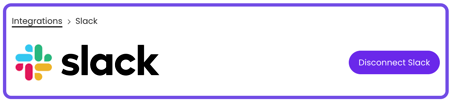
Now that the integration is set up, each teammate will need to connect to the Trainual app in Slack to start using the integration features. Here's how...👇
Step 2 — Connecting Slack to Trainual:
Integration installed? Great — now it's time to bring your team on board! ⛵ Have each teammate follow the steps below so they can connect their profiles and see firsthand how Trainual in Slack makes their day-to-day easier.
- Open Slack and navigate to the "Apps" section in your workspace.
- Click the three dots and choose "Manage" → "Browse apps" from the menu.
- Search for Trainual and click on the search result.
- Hit "Open App" from the left-hand app panel.
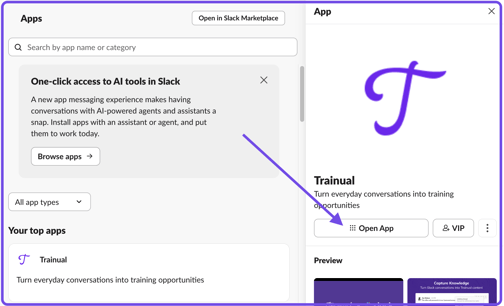
- Click the "Connect Trainual" button.
- Review the integration permissions and allow Trainual to access Slack.
📝 Please note: You may need to exit and reload Slack for the connection to apply.
Once linked, your team can create content, find answers, receive notifications, and use the AI Assistant, all directly in Slack. Keep reading to see these tools in action. 📖
Creating and capturing knowledge in Slack:
Outline content or turn any existing Slack conversation into Trainual training.
🔸 Start new Trainual content types from Slack:
- Open any Slack channel or Slack DM.
- Click the "Run shortcut" icon from the message composer.
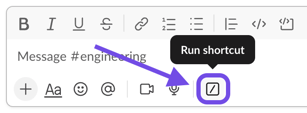
- Type Trainual and select one of the following three Trainual shortcuts:
- Enter your content details in the pop-up window and hit "Add."
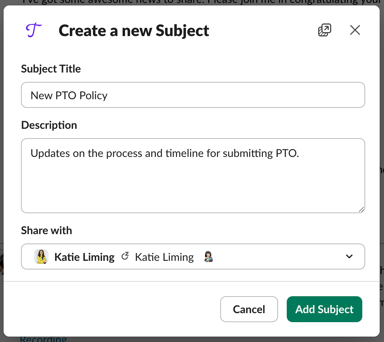
📝 Please note: Your new content will be waiting for you in Trainual, ready to build out whenever you are.
🔥 Tip: You can also use the keyboard shortcut "/trainual" to pull up the content list.
📸 Example: A subject outline created from Slack inside of Trainual:
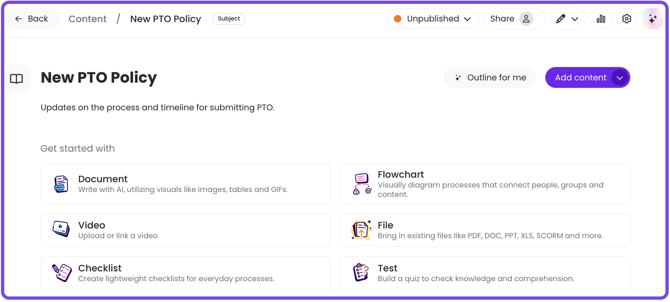
🔸 Turn existing Slack messages into Trainual content:
- Hover over the Slack message you want to capture as Trainual content.
- Click the three-dot menu or right-click the message.
- Select "Connect to apps" then "More message shortcuts" from the menus.
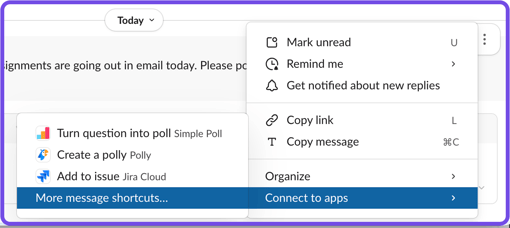
- Search for Trainual and select which action you'd like to take from the Trainual message shortcut list:
- Enter your content details in the pop-up window and hit "Add."
📝 Please note: The Slack message content is automatically pulled into your new Trainual content type — making it easy to turn tribal knowledge into structured documentation neccesary teammates can access moving forward.
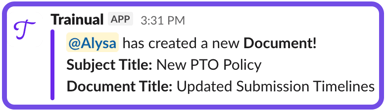
🔥 Tip: Looking to become the resident documentation guru on your team? Your work won't go unnoticed with these Trainual integration notifications in your Slack channels.
Finding Trainual answers in Slack:
Seeking answers? Search your Trainual library for specific content, or type a question to the AI Assistant and get a sourced answer back instantly.
🔸 Search for Trainual content from Slack:
- Open any Slack channel or DM.
- Type
/trainual searchfollowed by your search term.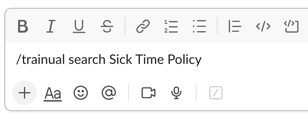
- Examples:
/trainual searchonboarding checklist./trainual searchPTO policy./trainual searchhow to process a refund.
- Examples:
- Hit "Enter" or "Return" on your keyboard.
- Take an action with one of the populated search results.
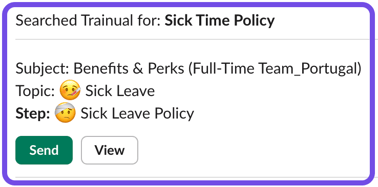
- Send button — Perfect for pointing a teammate to the right Trainual documentation without leaving Slack.
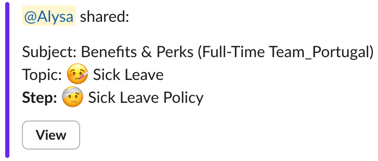
- Send button — Perfect for pointing a teammate to the right Trainual documentation without leaving Slack.
-
- View button — Opens the content in Trainual when you need full details.
📝 Please note: Search results and content viewing will respect Trainual content access restrictions and content discoverability parameters.
🔸 Ask the Trainual AI Assistant a question from Slack:
- Open any Slack channel or DM.
- Type
/trainual askfollowed by your search term.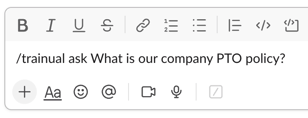
- Examples:
/trainual askWhat's our refund policy?/trainual askHow do I submit a time-off request?/trainual askWhat's the onboarding process for new hires?
- Examples:
- Hit "Enter" or "Return" on your keyboard.
- Take an action with the populated answer.
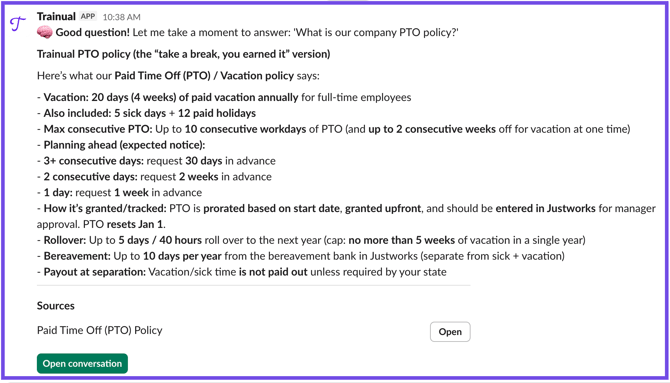
- Open button — Jump into the exact Trainual content the AI Assistant sourced its answer from.
- Open conversation button — Need to dig deeper? Continue chatting with the AI Assistant inside your Trainual account.
📝 Please note: AI Assistant answers and content viewing will respect Trainual permissions, content access restrictions, and content discoverability parameters.
🔥 Tip: Ready to stop repeating yourself? Get your team to
/trainual ask first. It'll make them more self-sufficient over time and your content starts to coach for you.Staying informed and taking action in Slack:
Get notified in Slack the moment something needs your attention in Trainual, and respond to it without switching tools.
Once your user profile is connected, Trainual will send notifications in real time for:
| 📑 Notification type | ⌚ When it's sent |
| Content assigned | A piece of published content is assigned to you. |
| Completion reminder | You have incomplete content assigned. |
| Feedback submitted | Someone submits feedback on content you own. |
| Feedback resolved | Feedback submitted on your content has been resolved. |
| Comment left | A new comment is added to content you're involved with. |
| Comment reply | Someone replies to a comment thread you're a part of. |
| Comment reopened | A resolved comment thread is reopened. |
| Comment resolved | A comment thread you're involved in is marked as resolved. |
| @mention in comment | You're @mentioned in a comment. |
| @mention in reply | You're @mentioned in a reply to a comment thread. |
| Review requested | Content is moved to "Pending" status and you (as the content owner) are asked to review it. |
📝 Please note: Each notification includes a link back to the relevant content in Trainual so users can take action immediately.
🔸 Where to find your Trainual notifications in Slack:
Notifications can be found under the "Messages" tab in your Trainual app in Slack.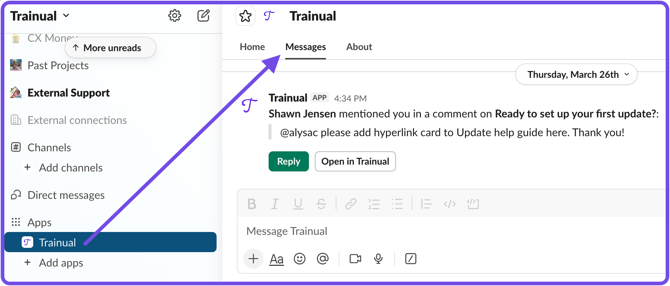
🔸 How to mute your Trainual notifications in Slack:
Need to be heads down for a bit? Simply open the Trainual app in Slack and hit the bell icon in the upper right-hand corner to temporarily disable the app sound and pop-ups.
FAQs:
Are the /trainual ask capabilties the same as the AI assistant in the Trainual app?
Yes — it’s the same underlying AI assistant. The Slack integration simply gives users access to it's question and answer functionality without having to open Trainual.
Are user specific Slack notifications on by default?
No — a Trainual Admin must enable the Slack integration from your company account first. Each user then connects their Trainual profiles to start receiving notifications.
How can I submit my feedback and ideas about features?
If you'd like to share your thoughts about the Slack integration or think of something else you'd like to see added in the future, send us your feature requests and ideas.
Learn more about integrations:
- Secure team logins and make them more convenient by adding SSO.
- Connect your Trainual account to thousands of other apps with Zapier.
- Connect your current HRIS or payroll system to Trainual for easy onboarding.