![Trainual Logo (White).png]](https://help.trainual.com/hs-fs/hubfs/Logo/Trainual%20Logo%20(White).png?height=39&name=Trainual%20Logo%20(White).png)
Great tools play well with others, and Trainual is no exception. Move your content and data, automate updates, and keep systems in sync using Trainual's API and webhooks.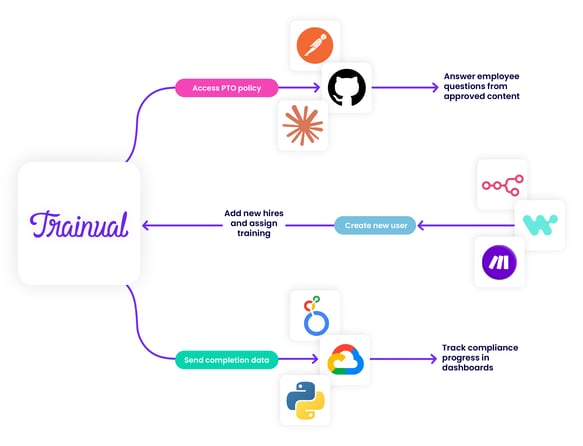
| 🧑💻 For developers: ↗ Jump right in: developers.trainual.com. |
👉 Before you start:
- Trainual's API and webhooks are available under:
- Premium and Enterprise training plans → full access to all endpoints.
- Operations suite subscriptions → access to all endpoints except assignments, completions, and content endpoints (which are accessible features only in training plans).
- Contact our support team if you need help with upgrading! 🤗
- Only those with an Admin+ permission level can create API tokens.
- This info is best suited for teams ready to go hands-on with code. Access to or partnership with a developer or tech person is recommended.
- ⚠️ Existing API connected customers: Trainual's API was updated on July 10th, 2026, with new access capabilities. The previous version is scheduled to be phased out by the end of 2026. To avoid disruptions, update your connections.
🗂️ Table of contents: Skip around to just the parts you need with these links.
Overview: API and webhooks — what are they?
An API (or application programming interface) is how one piece of software is able to "talk" to another. Think of it as your custom-built tech messenger saying: "Hey Trainual, give me this," or "Hey Trainual, update that" when it's requested.
| 🖼️ API Examples: |
|
By contrast, a webhook serves as a type of automatic "notification." Trainual's way of saying "this just happened" to your connected tech instantly, instead of "waiting to be asked" like with an API. Webhooks mainly trigger specific connected workflows when linked changes happen inside of Trainual.
| 🖼️ Webhook Examples: |
|
When used together, they can cover both directions — the API lets you reach in and grab what you need, while webhooks reach out the moment something new happens, so your syncs can work in tandem to go even deeper! 🤩
Not sure if these connections make sense for your team? 👀 This article will help you decide, and hand you the resources to get set up, if they do fit. Let's see if...
Are API and webhook connections the right fit?
🏁 Start by narrowing down what you're trying to accomplish. Ask questions like...
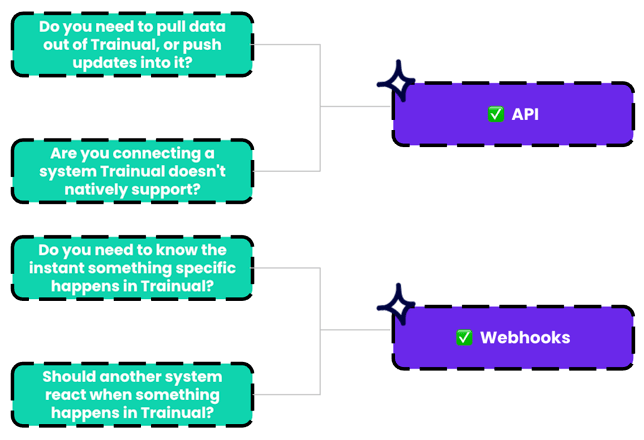
Think of this brainstorming session as step one (identifying the what), and looping in your developer as step two (figuring out and building the how).
When you're ready to rope in a tech team, the info below is what they'll need. 🤓
Resources to get you plugged in:
1️⃣ Developer documentation → The technical details.
📑 This is the critical resource to hand off to whoever's building your connections.
It walks through exactly how to authenticate, which endpoints are available, and what to expect from every request (AKA, what's needed to build and maintain syncs).
2️⃣ In-app → How to create a Trainual API token.
-
Click on your avatar from your top navigation bar.
-
Select "My settings."
-
Locate the "API Tokens" section.
-
Hit the "+ Create new token" button.
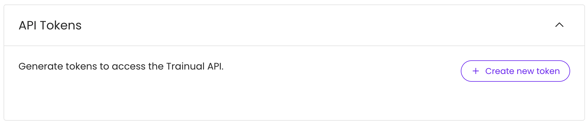
📝 Please note: Tokens operate on behalf of the user who creates them and inherit that user’s permissions. Keep this in mind when setting API token permissions.
Easily identify your tokens by naming them after the tool or agent they connect to and their function. Clear names matter for keeping multi-token creations organized!
Choose the data your token can access.
| 🔑 Token permission: | 🔓 What it unlocks: |
| Access users. | Create, view, update, archive, and restore individual users. |
| Access groups. | Create, view, and update groups, including their members and assigned training content. |
| Access responsibilities. | Create, view, delete, assign, and remove responsibilities for individual users. |
| Access assignments. | View, create, and delete training assignments for individual users. |
| Access completions. | View training completion records across the account, by user, or by subject. |
| Access content. |
View and search published training content across your Trainual account. |
| Access webhooks. | Create, update, delete, test, and monitor webhooks, including delivery logs and signing secret validation. |
| Access MCP tokens. | Issue, revoke, and rotate tokens that let AI agents authenticate and access training content. |
| Access activities. | View activity data for a specific user or across the entire Trainual account. |
📝 Please note:
- API token access can't be altered once created. Changes require a new token.
- Tool options are shown based on what you have access to as an individual user.
3️⃣ In-app → How to create a Trainual webhook event.
- Expand the "Account" options from the left-hand navigation menu.
- Choose "Settings."
- Open the "Developer" tab.
- Hit the "Create webhook" button to begin.

- Name your webhook something clear and concise.
- Select the endpoint URL (HTTPS is mandatory).
- Check off specific, individual events or choose "Select all events."
- Hit the "Create webhook" button to be granted a signing secret and be redirected to a place to send a test event.
📝 Please note: You can create up to 10 webhook utilizations per user account, each one supporting all available event connections.
And that's your basic toolkit! 🧰 You and your tech-savvy people are ready to start putting Trainual's API and webhooks to work. 🏗️
Tools that connect well with Trainual's API and webhooks:
While not an extensive list, here are a few examples of tools that sync well with Trainual!
 Claude (Anthropic): Connects your external AI assistant or agent directly to your Trainual content, so it can pull from and act on your training data.
 Postman: The developer tool used to test your Trainual API connection.
 Google Cloud (BigQuery): Pulls your Trainual data into a data warehouse for deeper reporting and analysis.
 n8n: A workflow automation tool that react to webhook alerts from Trainual.
 Looker: A dashboard builder that uses your Trainual completion and activity data as a foundation.
 Make: An automation tool that can trigger workflows the moment something happens in Trainual.
FAQs:
Will Trainual build a custom API integration for me?
Trainual doesn't build custom integrations for customers, but our full developer documentation has everything a tech person would need to get started.
Can I set up an API integration to create or edit training content?
Not yet. But this is on our roadmap. Stay tuned! 🛣️
What authentication method does Trainual's API use?
Bearer API tokens.
What are Trainual's API rate limits?
20 requests per 1 second per account and 25 requests per 1 second per IP address.
What's the difference between Trainual's API and webhooks vs. the MCP server?
API and webhooks are a standard and flexible way for developers or tech-savvy teams to write code that pulls from or updates data in Trainual via externally connected systems. The Trainual MCP server skips the coding and lets your AI tools connect directly to Trainual to search and retrieve content, data, etc. autonomously.
How can I submit my feedback and ideas about features?
If you'd like to share your thoughts about Trainual's API or think of something else you'd like to see added in the future, send us your feature requests and ideas.
Learn more about Trainual integrations and automations:
- Harness the power of Trainual, without having to leave Slack.
- Integrate your existing HR or payroll system to quickly import info to Trianual.
- Easily connect your Trainual account to thousands of other apps using Zapier.